Photos from your iPhone,
straight to your PC
Choose your photos, tap Share, then tap your computer. They turn up on your PC seconds later, at full quality. No cable, no emailing them to yourself, and nothing is uploaded to the internet.
Sending takes three taps
Once it is set up, this is all there is to it — every time, for as many photos as you like.
Choose your photos
One photo or fifty. Videos work too, and so do files from other apps.
Tap Share
The same Share button you already use — the little square with an arrow coming out of the top.
Tap your computer
It sits in the list along with everything else. The photos appear in your Downloads folder.
Setting it up takes a minute
You only do this once, on the computer you want to send photos to.
Open PC Drop on your PC
Double-click the file you downloaded — there is nothing to install. A page opens with a QR code on it: the square pattern you scan with a camera.
Point your iPhone at the code
Open the Camera app and hold it up to the code, then tap the message that slides down from the top of the screen.
Tap Add
That is the whole thing. From now on your computer appears whenever you tap Share on your phone.
Why people like it
No Wi-Fi? Still works
In the car, on holiday, anywhere. Turn on your iPhone's hotspot, connect your laptop to it, and carry on sending. It uses none of your mobile data, because the photos only ever travel between your own two devices.
Your photos stay yours
They go straight from your phone to your computer. They are never uploaded anywhere, nobody else can see them, and they arrive at full quality instead of being shrunk.
Nothing to sign up for
No account, no password, no subscription, no email address. Open it and it works.
Send a whole album at once
Pick fifty photos, share once, and get a single message telling you they all arrived.
See what came through
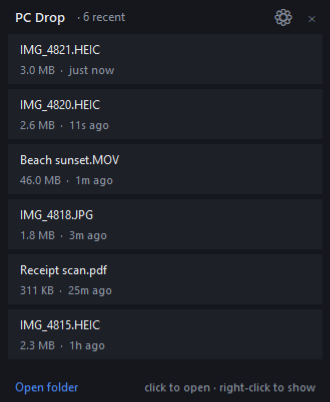
An optional little list sits on your desktop showing the latest arrivals, so you do not have to go hunting for them.
Other phones work too
An Android phone, an iPad, a friend's laptop — they open a web page on your computer and send their files from there instead.
This is an early version
It works, and it is used every day — but it has not been tried on many different computers, phones and home broadband setups yet, so you may run into the odd rough edge.
It keeps itself up to date. Whenever there is a better version, PC Drop tells you and installs it for you with one click. You will not need to come back to this page.
Common questions
Can I use it with an Android phone?
Yes, in a slightly different way. Android phones, iPads and other laptops open a web page on your computer and send their files from there. The three-tap version is an iPhone and iPad thing, because Apple is the only one that lets your computer be added to the list you see when you tap Share.
Windows shows a blue warning box when I open it.
Click More info, then Run anyway. Windows shows that box for any program whose maker has not paid for a certificate, which costs a few hundred pounds a year — hard to justify for something given away free. If that makes you uneasy, not installing it is a perfectly sensible choice.
Do I have to change any settings on my computer?
No. The first time you open it, Windows asks once whether to let your phone reach it — say yes and that is that. If you say no by accident, there is a menu item to ask again.
Does it send anything over the internet?
One thing, and only one: it asks this website whether a newer version exists. That is a version number and nothing else — no photos, no file names, no information about you or your computer. You can switch even that off.
Could someone else send photos to my computer?
Only someone already on the same Wi-Fi as you, who also knows your computer's address. If you are somewhere with shared Wi-Fi, like a café or an office, you can set a PIN so only you can send, or pause it until you need it.
Where do my photos end up?
In your Downloads folder, inside a folder called PC Drop. If you delete one from there, it also disappears from the list on your desktop.
How do I get rid of it?
Click the PC Drop icon next to your clock, choose Quit, then delete the file you downloaded. That is all — it does not scatter bits and pieces around your computer.