Your PC in the
iPhone Share sheet
Pick some photos, tap Share, tap your computer. They land in a folder on your PC at full Wi-Fi speed — no cloud, no account, no cable, and no app to install on the phone.
Three taps, every time
Once it is set up, sending is the same two gestures you already use for AirDrop.
Select in Photos
One photo or fifty. Videos and files from any app work too.
Tap Share
The normal iOS share sheet — nothing new to learn.
Tap Send to PC
Everything arrives in Downloads\PC Drop and pops up
on your desktop.
Setting it up takes a minute
Once, on the PC you want to send to.
Run PC Drop
No installer. It appears in the system tray and opens a page with a QR code.
Scan the code
Point the iPhone Camera at it and tap the banner.
Tap Add Shortcut
That is the whole setup. Your PC is now in the Share sheet, for good.
Why not just use the cloud?
It works with no Wi-Fi at all
In a car, on a plane, anywhere. Turn on the iPhone's Personal Hotspot, join it from the laptop, and keep sending — it uses no mobile data, because nothing leaves the link between the two devices.
Nothing is uploaded
Files go straight from the phone to the PC over your own network. No server sees them, nothing is compressed, and your photos keep their original quality.
No account, ever
No sign-in, no subscription, no email address. Run it and it works.
Many photos at once
Select fifty, share once, get one notification telling you how many arrived.
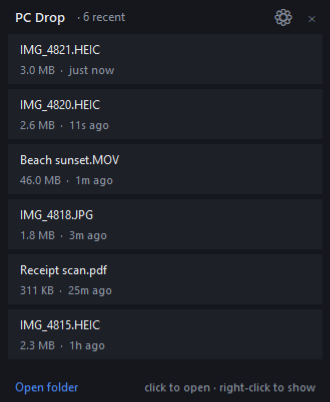
A panel on your desktop
Optional, sits under your windows like a gadget, and shows what just landed without opening Explorer.
Anything can send
Android, an iPad, a friend's phone, another laptop — they open the PC's page in a browser and drop files there.
This is a beta
It is finished enough to use every day, and it is used every day — but it has not been through many different machines, routers or phones yet. Expect the occasional rough edge.
It updates itself. When a new version appears here, PC Drop tells you, and the tray menu installs it with one click. You will not have to come back to this page.
Questions
Does this work with Android, or a Windows laptop sending to another PC?
Yes, through the browser rather than the share sheet. Any device on the network can open the PC's page and drop files onto it. The one-tap share sheet shortcut is an iPhone and iPad feature, because only iOS lets an app be added to its share menu that way.
Windows says it is from an unknown publisher.
It is unsigned — a code-signing certificate costs a few hundred pounds a year, which is hard to justify for a free tool in beta. Click More info, then Run anyway. If you would rather not, that is a completely reasonable decision.
Do I need to open a firewall port?
PC Drop asks once, the first time it runs, and sets it up itself with a single Windows prompt. If you decline, there is a menu item to do it later.
What does it send to the internet?
One thing: a request to this site asking whether a newer version exists. That is a plain version number — no identifiers, no file names, no statistics — and you can switch it off in the tray menu. Your files never leave your own network.
Can other people on the network send me files?
Only if they can reach your PC and know the address. If you are on a shared or public network, turn on Require a PIN in the tray menu, or pause receiving when you are not expecting anything.
Where do the files go?
Downloads\PC Drop by default. Delete something from
that folder and it disappears from the desktop panel too.
How do I uninstall it?
Quit it from the tray and delete the exe. It keeps one small
settings file in %LOCALAPPDATA%\PCDrop you can delete
as well. Nothing is written to the registry except the optional
"start with Windows" entry, which is removed when you turn that
off.